Hi Bernt
Thanks a lot
I havent sée that
Another mistake a made i go too fast when i modify pcb!!!!!
Finishing my rod shaft
thanks again
-
Hello Nick Holas
please check your Sprint Layout Settings, look pictures attached
risk of damage, caused by Thermal Pad connection
@ Tim
look at bottom side
there is diagram
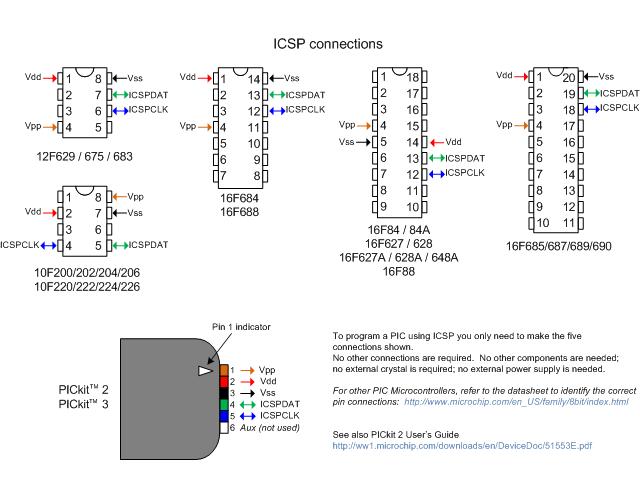
it say for dip8/14
set jumper 1 to pos. B
jumper 2 to pos. 2+3
jumper 3 to pos. 2+3
place chip as shown on bottom
i have ordered same socket, at first i looked like a pig in the clockwork, because it searched some resistor or so
but this thing it realy easy and it work also for pic16f876Leave a comment:
-
Very good 6666 8/14/18/20, yes, I was wrong thinking the 16F57 position. I will check before powering up, but I am afraid I have much to learn blindly...So , it's after midnight here now. Tomorrow I will position and check the chip in the icsp-I have the lead worked out-plug it in, fire it up, and see what screens come up.
Baby steps, but in the right direction. Thanks matey.Leave a comment:
-
Ah I think the little drawing on the right side of the icsp is showing the notch in the chip and the chip should be inserted at that point in the icsp
check with a meter.
7chips go in one direction and 1 chip goes in the other way round
so if thats correct, plug the 1824 into the pin thats says 8/14/18/20Leave a comment:
-
Do you have a schematic for the icsp ?
programming with mplab is easy and only takes a few steps, one of the important ones is to turn on the 5v power in the menu
however the icsp needs to have correct jumpers as well, I have an icsp similar to yours which I dont use
but it came with a cct to get the jumpers right, google the chip you want to program and you will see what pins are required.
a 16F1824 is 14 pins so icsp has to be wired for a 14 pin pic. you can check with mutlimeter,
take notice of the white triangle on the pickit. thats pin1 VPP, mplab should start from shortcut and talk to icsp, but you have to select it in hardware
Leave a comment:
-
Ok that 3.10 thingy has exe and an msi. I need to take the files out of the zip? to where? then what? The MPLAB IDE 8.92 had 5 files-mplabcert,ISSetup.dll,Data1,MPLABtools v8.93, and setup(launcher) the latter was the one I successfully ran from downloads file. They are all still there...
I have the MPLAB IDE v8.92 successfully installed..I think. Opens to a screen when I click on the shortcut. As my compooter has limited usb ports, I can't be online and open it at the same time, as I need to safely remove hardware - the pre-paid thingamebob- before I can plug the pickit3 in...
Seems a step-by-step to install for dummies, and a step-by-step to program a 16F1824 chip is going to be a big ask...
AAARRRRGGGHHH!!!!!!!

Leave a comment:
-
This is the kit I got 6666. Correct me if I'm wrong, but J1 jumper needs to be across position2 for 16F's ? Bloody confusing, as the destructions say positionB (ABC not 123).
Jumpers J2-J7 are in place.
Thanks eclipse, going back there for a look now. Is that MPLAB IDE 8.92 thingy something separate to the 20v3.10 thing, or just a latest version of it?
I had to plug the pickit into usb port to get the download to complete, so I presume it updated then- the lights were flashing..
Unsurprisingly all the online tutorials I have found presume I already know about programming.....Leave a comment:
-
Leave a comment:
-
Download the Pickit software. For Example (don't know if there's a new version, after installing try to update):
http://ww1.microchip.com/downloads/en/DeviceDoc/PICkit3%20Programmer%20Application%20v3.10.zipLeave a comment:
-
Okay, I got my pickit 3 today. Downloaded MPLAB v8.92. It was a zip file. Eventually and tentatively I unzipped it and double-clicked the Setup wizard. I have installed it, but unsure if I did this properly. Got shortcuts and windows, usb recognises pickit unit. But all the files from the zip are still in downloads. Can anyone tell me where they should be, or if the install will have put them(copies) where they should be?
What do I do next?
I searched for hours online, and nothing back to these basics, and the rest is gobbledigook. I have 3 PDF versions of instructions-all mean nothing to me. Much talks about de-bugging, and all I want to do is program the bloody chip. But I have no idea where to start.
Any advice greatly appreciated- no acronyms please.
Leave a comment:
-
Yes instead of the BS170 & 3 resistors there (I kept R13/10R) I will have MCP1407, since I have those from previous builds.
I needed to inverse the TX signal because otherwise I would need to use inverting chip which I don't have.Leave a comment:
-
Nice work !
I assume that the extra chip IC4 is a FET driver ?
Looking forward to seeing the complete stuffed board in action.
- BernardLeave a comment:
-
I wanted to make few changes (inverse TX polarity, slightly increase pulse width).
With the help of the correct project settings I'm sure the changed hex will be working just fine.
Here's my board. It's 80x45 in size, few cosmetic changes here and there to fit parts I already have.
Leave a comment:
-
I use MikroC Pro 5.61 as compiler.
Why are you trying to recompile the source code to match the exact binary/hex output ?
You can use the source code as a reference to change some things.
Or - you just take the hex file as is and program the PIC.
Best regards,
- BernardLeave a comment:
-
That helps a lot Bernard!
I made my configuration registers match yours.
Still hex has some differences but I loaded in Proteus and looks to be working fine.
Probably some internal compiler differences (maybe?!) give somewhat different results.Leave a comment:


Leave a comment: